AirStudio allows you to upload videos, images, and audio files to your Library for use in Streams, Recordings, and Podcasts.
Supported File Formats and Size Limits
Media Type | Supported Formats | Maximum File Size |
|---|---|---|
Video | MP4, MOV, WebM | 2 GB |
Image | JPG, PNG, GIF, WebP | 20 MB |
Audio | MP3, WAV, OGG, AAC | 50 MB |
How to upload media
Navigate to Studio → Library.
Click + Add Media.
Drag and drop your files or click Click to upload.
Select the files you want to upload.
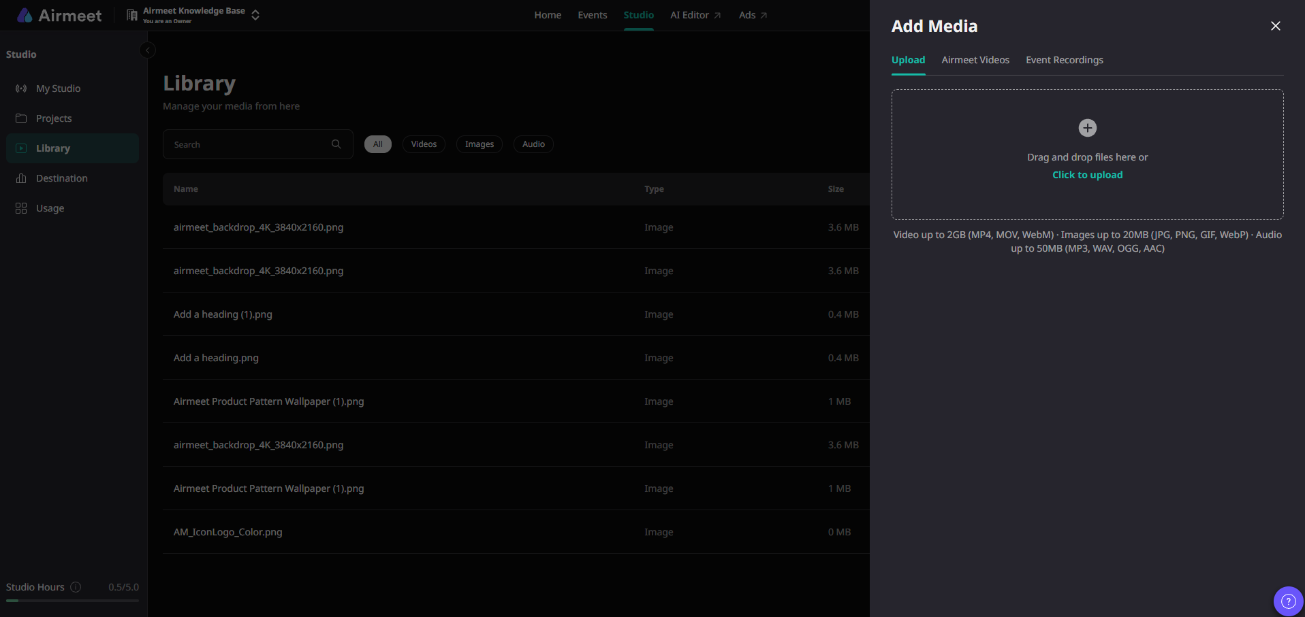
Note: Ensure your files meet the supported format and file size requirements.
Was this article helpful?
That’s Great!
Thank you for your feedback
Sorry! We couldn't be helpful
Thank you for your feedback
Feedback sent
We appreciate your effort and will try to fix the article