

TABLE OF CONTENTS
- 1. Overview
- 2. How It Works
- 3. How to Nudge Speakers
- 4. What Happens After Nudging
- 5. Best Practices
- 6. Notes
1. Overview
Keep your sessions on track by nudging speakers with quick sound alerts. This feature allows hosts and organizers to notify speakers on stage without interrupting the session flow—ideal for time management and smooth transitions.
2. How It Works
The Nudge Speaker feature sends a short audio alert to speakers and organizers currently on stage, helping them stay aligned with session timelines (e.g., wrap up, speed up, or transition).
3. How to Nudge Speakers
Step 1: Join the session as a host, co-host, or organizer.
Step 2: Open the Speaker Chat panel on the right-hand side.
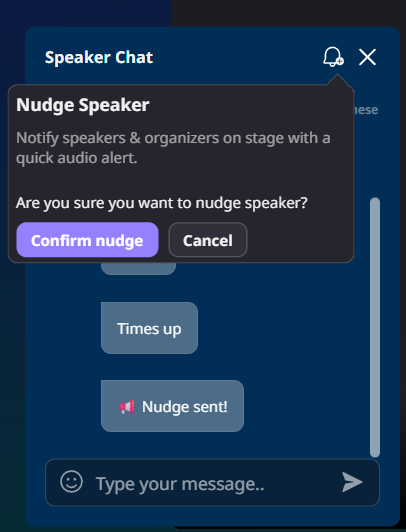
Step 3: Click on “Nudge Speaker."
Step 4: Confirm the action by clicking “Confirm nudge” in the prompt.
4. What Happens After Nudging
A sound notification is sent to all speakers and organizers on stage.
A confirmation message (“Nudge sent!”) is displayed to the sender.
This does not interrupt the live session or affect attendees’ experience.
5. Best Practices
Use nudges to signal time reminders (e.g., 5 minutes left).
Avoid excessive nudging to prevent distraction.
Coordinate with speakers beforehand so they understand what the nudge indicates.
6. Notes
This feature is only available to hosts, co-hosts, and organizers.
Only participants on stage receive the sound alert.
Attendees do not hear the notification.
Need more help? Contact support@airmeet.com or visit our Customer Support Lounge.
Was this article helpful?
That’s Great!
Thank you for your feedback
Sorry! We couldn't be helpful
Thank you for your feedback
Feedback sent
We appreciate your effort and will try to fix the article